AMSI Internals Part 1: The Full Scan Pipeline
Overview
Before you can bypass something reliably, you need to understand exactly what you are bypassing. This post uses Frida to trace the AMSI scan pipeline from inside a live PowerShell process - watching each function fire in real time, reading arguments as they are passed, and identifying the exact location that controls the scan verdict. Where Frida shows the call flow, WinDbg disassembles the validation logic so you can see exactly how each classic bypass targeted the code.
What you will understand by the end:
- Where each AMSI function fires in the PowerShell execution lifecycle
- The six arguments to
AmsiScanBuffer- including the result pointer that determines whether execution is blocked - Why the classic reflection-based bypasses worked, and why each was caught - explained in terms of what they were actually attacking
- Why hardware breakpoints work where patching does not, and what Part 2 will implement
This post is the foundation. Part 2 builds the bypass.
All techniques described here were performed in an authorised lab environment. For educational purposes only.
How AMSI Works
AMSI is a broker API - it does not scan content itself. It accepts a buffer from the host application and routes it to whichever antimalware provider is registered. On a default Windows system that provider is MpOav.dll (Windows Defender’s AMSI component).
The Scan Flow
When any AMSI-aware host starts - PowerShell, the .NET CLR, mshta - it loads amsi.dll into the process and calls through this sequence for every script block:
1
2
3
4
AmsiInitialize()    →  creates AMSI_CONTEXT (once, process-wide)
AmsiOpenSession()   →  creates HAMSISESSION (per runspace or script execution)
AmsiScanBuffer()    →  submits buffer to provider, writes verdict to result pointer
AmsiCloseSession()  →  releases session handle
One detail that matters: AmsiScanBuffer does not return the scan verdict directly. It returns an HRESULT indicating whether the API call succeeded. The actual verdict - clean or detected - is written to a pointer passed as the sixth argument.
| AMSI_RESULT value | Meaning |
|---|---|
0 | AMSI_RESULT_CLEAN |
1 | AMSI_RESULT_NOT_DETECTED |
32768 | AMSI_RESULT_DETECTED - execution blocked |
This distinction is the foundation of Part 2. The return value (HRESULT) is not the target. The result pointer is.
Relevance to Custom Tooling
In a standard PowerShell process, AMSI is enforced by the host - you cannot influence it from script level without attacking the API itself. In a custom .NET runspace (a C# implant hosting PowerShell), your process is the host. The scan flow above runs inside your process. That means you can instrument every stage of it.
Tracing the Pipeline with Frida
Prerequisites: Python 3 + pip install frida-tools. Frida attaches to a running process without suspending it - PowerShell stays fully interactive throughout.
Setup
Open a standard PowerShell window and note the PID:
1
$PID
In a separate terminal, start Frida tracing all AMSI exports:
1
frida-trace -p <PID> -x amsi.dll -i Amsi*
Frida hooks every exported function and creates JavaScript handler files for each:
1
2
3
4
5
6
Instrumenting functions...
AmsiInitialize:   __handlers__\amsi.dll\AmsiInitialize.js
AmsiOpenSession:  __handlers__\amsi.dll\AmsiOpenSession.js
AmsiScanBuffer:   __handlers__\amsi.dll\AmsiScanBuffer.js
AmsiCloseSession: __handlers__\amsi.dll\AmsiCloseSession.js
Started tracing 9 functions. Press Ctrl+C to stop.
Type anything in PowerShell - "test" - and the Frida output shows the full pipeline. Every command follows the same sequence: AmsiOpenSession → AmsiScanBuffer → AmsiCloseSession. The session wraps each scan.
Inspecting AmsiScanBuffer Arguments
To expose all six arguments and the scan verdict, edit __handlers__\amsi.dll\AmsiScanBuffer.js:
1
2
3
4
5
6
7
8
9
10
11
12
onEnter: function (log, args, state) {
  log('[*] AmsiScanBuffer()');
  log('|- amsiContext:  ' + args[0]);
  log('|- buffer:       ' + args[1].readUtf16String());
  log('|- length:       ' + args[2]);
  log('|- amsiSession:  ' + args[4]);
  log('|- result ptr:   ' + args[5]);
  this.resultPointer = args[5];
},
onLeave: function (log, retval, state) {
  log('|- result value: ' + this.resultPointer.readU16() + '\n');
}
Frida hot-reloads the handler automatically - no restart needed. Run "test" in PowerShell:
1
2
3
4
5
6
7
8
9
10
11
12
/* TID 0x827c */
AmsiOpenSession()
[*] AmsiScanBuffer()
|- amsiContext:  0x250d196d850
|- buffer:       "test"
|- length:       0xc
|- amsiSession:  0x5f4c
|- result ptr:   0x976ab8e6c0
|- result value: 1

/* TID 0x7648 */
AmsiCloseSession()
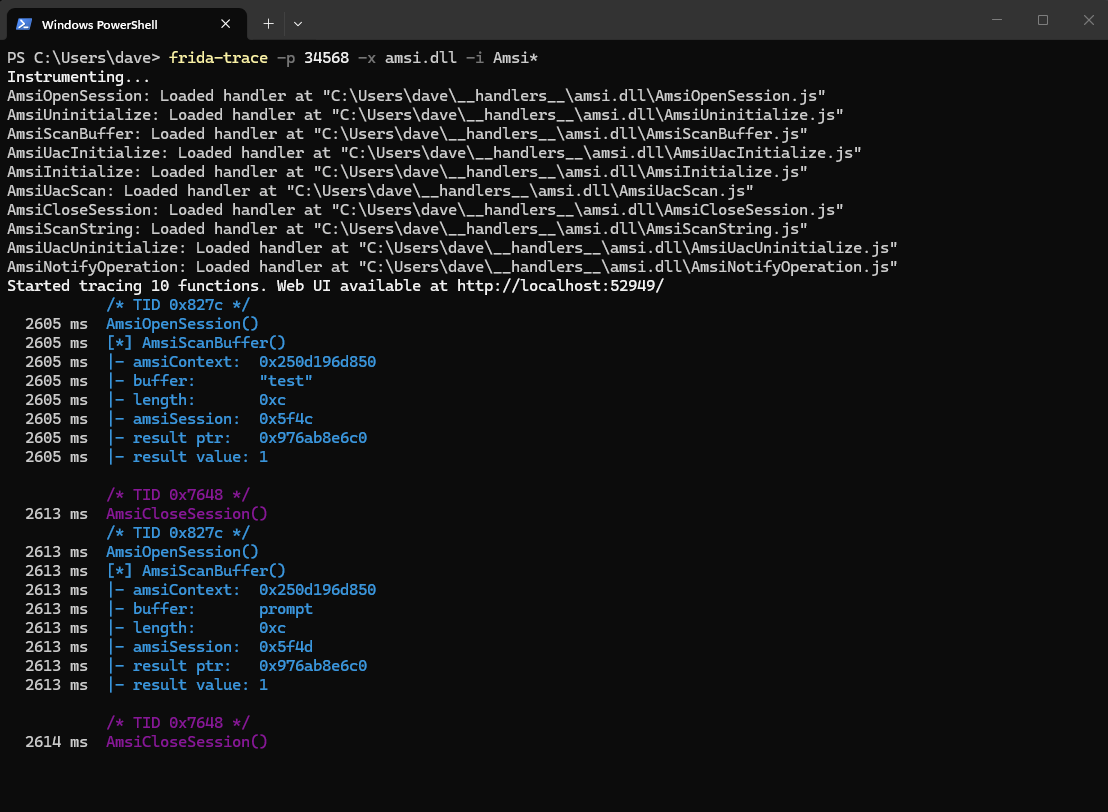
Note two things:
buffer- the exact text PowerShell submitted for scanning, as a Unicode stringresult ptr- the address where the verdict will be written. This address is stable across scans in the same sessionresult value: 1-AMSI_RESULT_NOT_DETECTED. Values below32768are safe; values at or above32768are malicious
Seeing a Detection
Now trigger a detection. In PowerShell, type a string Defender flags:
1
'Invoke-Mimikatz'
PowerShell blocks it. In the Frida output:
1
2
3
4
5
6
7
8
9
10
11
12
/* TID 0x827c */
AmsiOpenSession()
[*] AmsiScanBuffer()
|- amsiContext:  0x250d196d850
|- buffer:       'Invoke-Mimikatz'
|- length:       0x22
|- amsiSession:  0x5f71
|- result ptr:   0x976ab8e6c0
|- result value: 32768

/* TID 0x7648 */
AmsiCloseSession()
After blocking the command, PowerShell triggers additional scans for its own internal error-formatter script blocks as it builds the “malicious content” error message. Every internal script block gets scanned before execution - AMSI is scanning more than just your input.
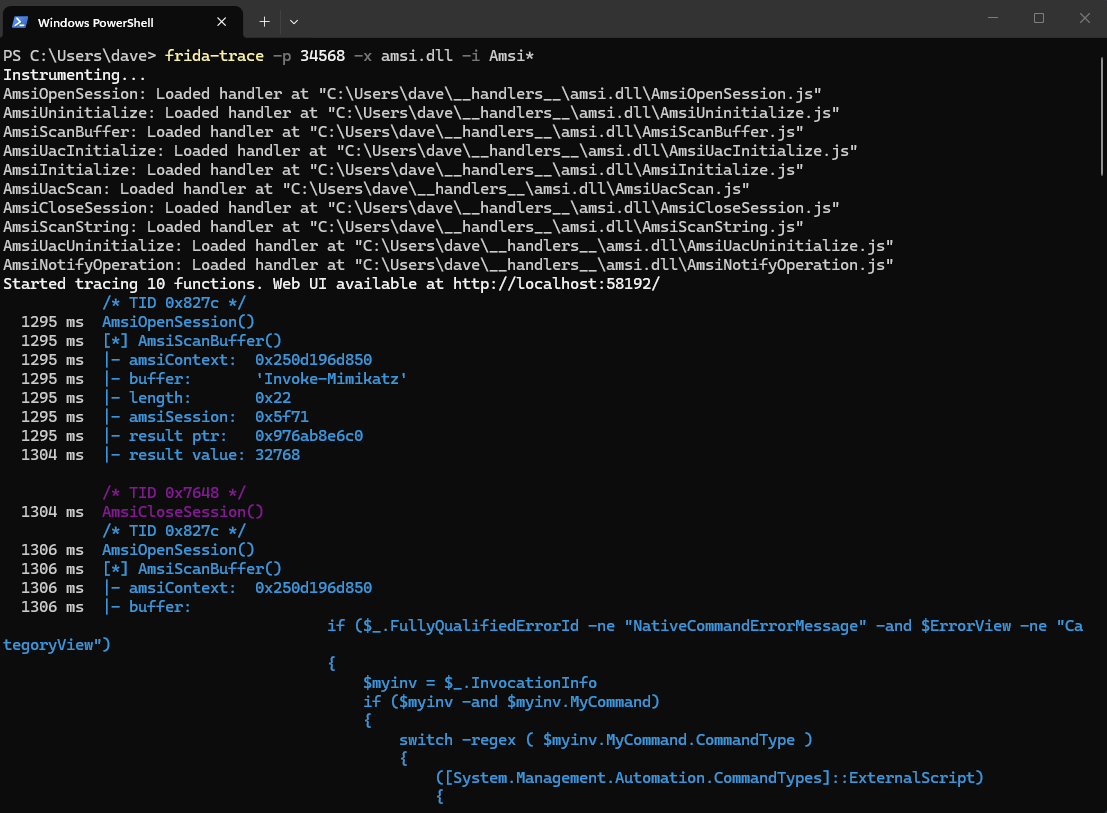
32768 = AMSI_RESULT_DETECTED. The provider wrote this value to the result pointer address, PowerShell read it, and threw the block error.
The result pointer address (0x976ab8e6c0) is stable across scans in the same session. Part 2 intercepts execution at AmsiScanBuffer’s first instruction, reads that address, and writes 1 before the provider runs.
Inspecting AmsiOpenSession with WinDbg
Frida shows us the call flow and arguments. WinDbg shows us the validation logic inside the functions - specifically, the check that the classic amsiContext bypass was attacking.
Attach WinDbg to the same PowerShell process (windbg -p <PID>) and disassemble AmsiOpenSession:
1
2
3
4
.sympath srv*C:\Symbols*https://msdl.microsoft.com/download/symbols
.reload
lm m amsi
u amsi!AmsiOpenSession L1A
amsi!AmsiOpenSession:
00007fff`898f8a50 4885d2          test    rdx,rdx
00007fff`898f8a53 740c            je      amsi!AmsiOpenSession+0x11   ; ← null session ptr → error
00007fff`898f8a55 4885c9          test    rcx,rcx
00007fff`898f8a58 7407            je      amsi!AmsiOpenSession+0x11   ; ← null context ptr → error
00007fff`898f8a5a 4883790800      cmp     qword ptr [rcx+8],0         ; ← internal ptr check
00007fff`898f8a5f 7507            jne     amsi!AmsiOpenSession+0x18
00007fff`898f8a61 b857000780      mov     eax,80070057h               ; ← error return (E_INVALIDARG)
00007fff`898f8a66 c3              ret
00007fff`898f8a68 4883791000      cmp     qword ptr [rcx+10h],0       ; ← second internal ptr check
00007fff`898f8a6d 74f2            je      amsi!AmsiOpenSession+0x11
...
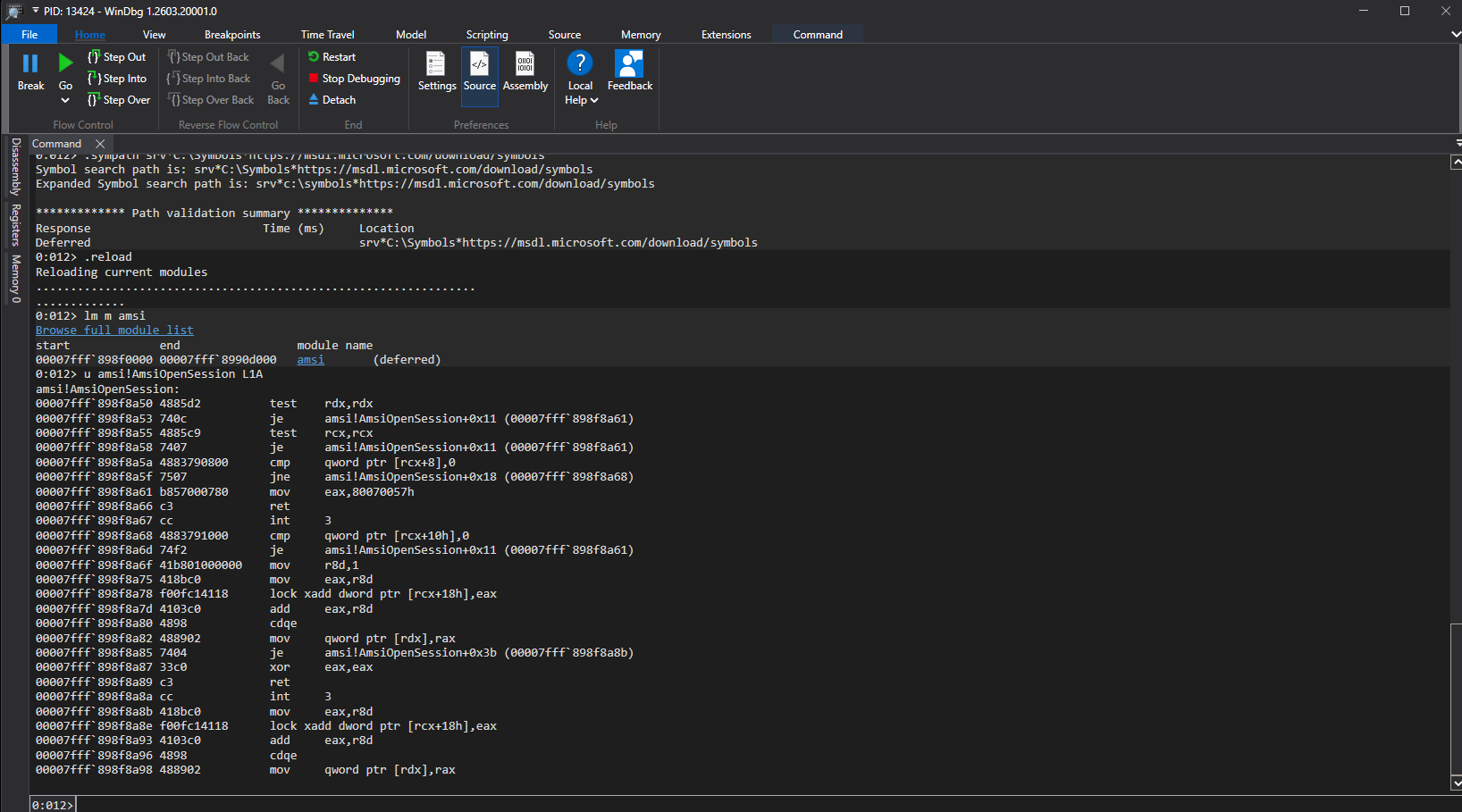
Line by line:
test rdx,rdx- null check on theamsiSessionoutput pointertest rcx,rcx- null check on theamsiContextpointercmp qword ptr [rcx+8],0- checks that an internal pointer at offset 8 inside the context structure is non-zero; if zero, fall through to the error pathmov eax,80070057h+ret- returnE_INVALIDARGimmediatelycmp qword ptr [rcx+10h],0- checks a second internal pointer at offset 16
Note on older versions: Earlier Windows builds included an explicit
cmp dword ptr [rcx],49534D41h- a check that the first four bytes of the context structure matched the ASCII stringAMSI(0x49534D41little-endian). That is the check theamsiContextnulling bypass was targeting on the native side. Current builds have replaced it with internal pointer validation at offsets 8 and 16 - Microsoft restructured the validation without the static magic constant.
Classic Bypasses in Context
With the internals visible, the bypass history maps directly to what you just saw:
| Technique | What it attacked | Why it was caught |
|---|---|---|
amsiContext nulling | Managed AmsiUtils.amsiContext field - corrupts the context pointer before the native API is called; on older builds also bypassed the cmp 49534D41h magic check inside AmsiOpenSession | String amsiContext statically signatured; GetFields(NonPublic,Static) + Marshal::Copy on AmsiUtils is a behavioral rule |
amsiInitFailed | .NET AmsiUtils.amsiInitFailed boolean - bypasses the managed wrapper before the native API is reached | String amsiInitFailed statically signatured; same field-enumeration pattern flagged |
AmsiScanBuffer patch | The scan function itself - VirtualProtect + patch bytes replace the entry point with a stubbed return | Entry-point patch byte sequences statically signatured; VirtualProtect on a module’s memory page is a high-signal event |
AmsiOpenSession patch | Session creation - forces an invalid session, scan is skipped | VirtualProtect on module page combined with Marshal::Copy to amsi.dll address range |
Each technique attacked a different layer of the scan flow. Each was killed by a specific rule - either a static string signature or a behavioral pattern on the memory operations involved.
The pattern: the closer an attack gets to the memory of amsi.dll itself, the more visible it becomes. Patching requires making memory writable. Making memory writable is logged.
What Part 2 Targets
The Frida trace and WinDbg session established three things:
AmsiScanBufferis the mandatory chokepoint - every script block passes through it- The scan verdict lives at a stable address passed as the sixth argument - readable from Frida as
args[5], readable in WinDbg as[RSP+0x30]at function entry - Writing
1(AMSI_RESULT_NOT_DETECTED) to that address before the provider runs bypasses the scan
Hardware breakpoints use the processor’s debug address registers (DR0–DR3) to trigger a STATUS_SINGLE_STEP exception when execution reaches a specific address - the first byte of AmsiScanBuffer. A Vectored Exception Handler (VEH) catches the exception, receives the full register state in a CONTEXT structure, reads Context.Rsp to locate [RSP+0x30], dereferences it to get the result pointer, writes AMSI_RESULT_CLEAN, then skips the function by advancing the instruction pointer past it.
No byte of amsi.dll is modified at any point.
| Technique | Writes to amsi.dll | VirtualProtect | Detection surface |
|---|---|---|---|
| amsiContext / amsiInitFailed | No (managed memory) | No | Static string + reflection behavioral rule |
| AmsiOpenSession / AmsiScanBuffer patch | Yes | Yes | VirtualProtect on module page |
| Hardware breakpoint (Part 2) | No | No | SetThreadContext with DR registers non-zero |
The full implementation - DR7 enable bit layout, SetThreadContext from a thread you control, VEH registration order, reading CONTEXT.Rsp to recover the argument stack, and skipping the function cleanly - is covered in AMSI Bypass Part 2: Hardware Breakpoints.
Detection Notes
| Technique | Signal | Defender | MDE |
|---|---|---|---|
| amsiContext / amsiInitFailed | Static string + reflection behavioral rule | Caught | Caught |
| AmsiScanBuffer / AmsiOpenSession patch | VirtualProtect on module page + Marshal::Copy | Caught | Caught |
| Hardware breakpoints (Part 2) | SetThreadContext with non-zero DR registers | Not alerted | Low-medium visibility |
References
- AMSI documentation - Microsoft Learn
- AmsiScanBuffer - MSDN
- Frida JavaScript API reference
- MITRE ATT&CK T1562.001 - Disable or Modify Tools
- OSEP
Related posts: